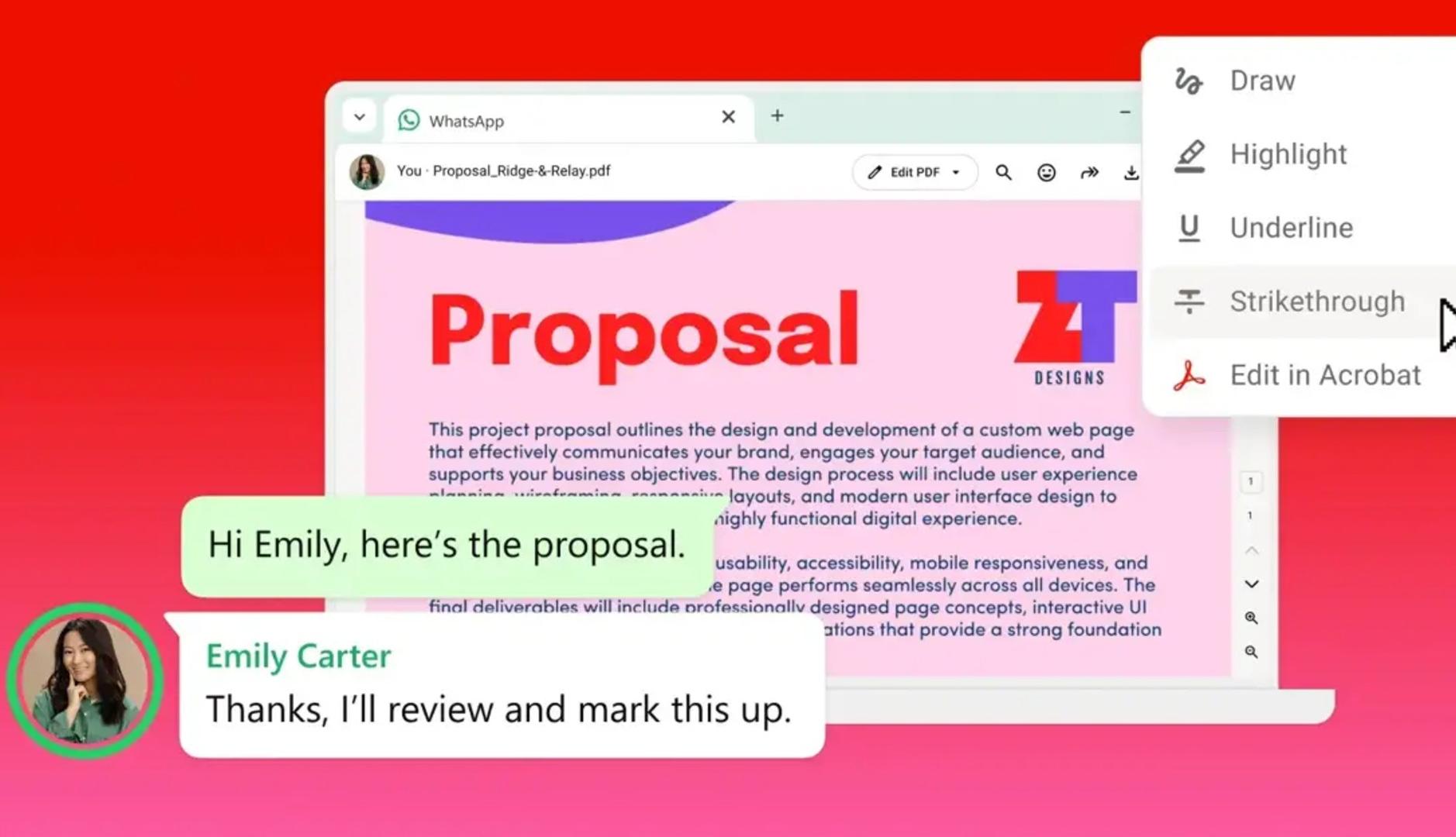
Adobe has long allowed you to view and share PDF documents between users and through WhatsApp chats, but now it goes one step further by integrating Acrobat into the instant messaging platform, both in its Web version and in Windows. This makes it easier for users to open, review and manage documents directly from WhatsApp without having to download files or change tools.
Adobe expands its presence by becoming part of a tool that is already common at work
Adobe’s goal is to continue facilitating the daily lives of professionals and users, maintaining agility and consistency in workflows. The company is also committed to expanding its presence by being part of a space that for many people around the world has become an essential tool in both personal and work life.
As the company explains in a statement, the integration allows the user to receive a document and act on it instantly thanks to Acrobat’s functionalities, including the artificial intelligence assistant. This allows for frictionless working, whether you are reviewing an invoice or contract, consulting a design or confirming details of a text. The Acrobat experience on WhatsApp includes:
- PDF previews that open directly in the conversation
- Full screen PDF viewing in chat, also for password protected files
- Annotation tools for highlighting, strikethrough, and more
- Access to advanced Acrobat tools to edit and return the revised PDF directly to the chat
In this way, from now on when someone shares a PDF on WhatsApp Web or Windows, it can be opened directly in the conversation, scroll through the document, enlarge the image and read the full text without downloading the file or changing applications; all this while preserving the design and format.
You can also add feedback directly from the chat with the usual PDF tools. Thus, you can draw, highlight, underline and cross out text, circle a fragment that you want to highlight so that a classmate can review it, cross out a wrong word or underline the most important details.
For more elevated needs, users can click “Edit in Acrobat” to access additional Acrobat functionality to edit, organize, sign, or set a password. AI Assistant also allows you to summarize, ask questions, and extract key information from documents, as long as you have an Acrobat subscription. When finished, simply share the updated file again in the same WhatsApp conversation.
In addition, as highlighted by Adobe, documents shared in chats remain end-to-end encrypted, like the rest of the personal messages, which means that only those participating in the chat can read them.
“Acrobat is designed to power document workflows wherever they happen.” says Abhigyan Modi, Senior Vice President of Adobe’s Creative and Productivity division, in a statement. “Bringing PDF functionalities to WhatsApp Web and Windows expands that vision to one of the most important communication platforms in the world”.